
Add a professional author box under every WordPress post with Simple Author Box. It gives readers a face, a name, and a reason to trust you. That matters fast. Nielsen Norman Group says users often leave web pages in 10 to 20 seconds [source: Nielsen Norman Group].
TLDR: Use Simple Author Box to show who wrote each post, why they know the topic, and where readers can find them online. Add a photo, short bio, job title, and social links. For example, a recipe blog with 40 monthly posts can help readers spot posts by a trained chef versus a guest writer in seconds. That tiny trust boost can keep people reading instead of bouncing away.
Why author boxes matter
People do not trust mystery content. They want to know who is talking. A clean author box answers that without making them hunt through your site.
Think of it like a name tag at a conference. No name tag feels weird. A good one says, “Hi, I am real. I know this stuff. Please do not run away.”
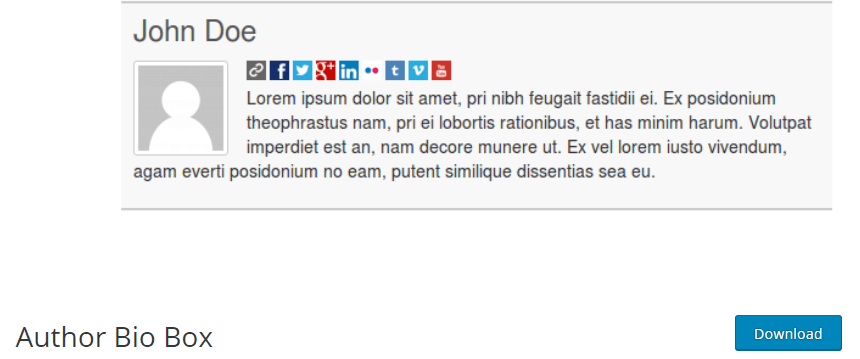
Simple Author Box makes that easy on WordPress. It adds a neat box under your posts. It can show your avatar, name, bio, website, and social icons. No messy coding. No theme surgery. No panic.
Image not found in postmetaWhat a strong author box should include
A good author box is short. It is clear. It does not brag for three miles.
- Real name: Use the name readers see across your site.
- Clear photo: Use a friendly headshot. Not a blurry crop from a wedding.
- Short bio: Two or three lines are enough.
- Proof of skill: Add your role, niche, or experience.
- Social links: Add only the places you actually use.
- Website link: Send readers to your profile, portfolio, or main site.
Here is a simple bio example:
“Mia writes about WordPress, small business sites, and plugins that save time. She has helped 120+ site owners clean up slow pages and confusing layouts.”
That works. It is human. It gives proof. It does not sound like a robot in a suit.
Why Simple Author Box is a smart pick
The Simple Author Box plugin is built for this exact job. It keeps author details clean and visible. It also works with many WordPress themes, which is a relief.
Honestly, it feels like some plugins turn one tiny design change into a 12 minute treasure hunt. This one is much kinder. You install it, set your options, and move on with your life.
You can control colors, typography, borders, and icon styles. You can also add social profiles. That helps your author box match your brand instead of looking like it wandered in from 2011.
If you want more control, check the official site at WP Author Box. It gives you more details about features, layouts, and ways to make author profiles look polished.
How to set it up
Setup is simple. Really. You do not need to be a developer.
- Go to your WordPress dashboard.
- Click Plugins, then Add New.
- Search for Simple Author Box.
- Install and activate it.
- Go to the plugin settings.
- Pick your layout, colors, and icon style.
- Update each user profile with a bio and links.
Now open a post. Scroll to the bottom. Your author box should appear there. If it looks odd, tweak the spacing, font size, or colors.
Make the bio feel real
This is where many sites fall flat. They write bios like this:
“John is a passionate content creator with a love for excellence.”
That says almost nothing. It drives me crazy because it uses space, yet gives no reason to trust John.
Try this instead:
“John writes WordPress guides for beginners. He has built and managed small business sites since 2016.”
Better, right? It is direct. It tells readers why John has a clue.
Use author boxes for guest posts
Guest posts need author boxes even more. Readers may not know the guest writer. A strong box gives quick context.
Add their company, field, and best social link. If they wrote about email marketing, say why they know email marketing. If they wrote about fitness, mention coaching, training, or real work in that field.
This also helps your site look more serious. It shows you care about who publishes on your blog.
Keep the design clean
Your author box should not scream. It should support the article.
- Use one clean photo shape.
- Keep the bio under 60 words.
- Use brand colors, but do not overdo it.
- Make social icons easy to tap on mobile.
- Check contrast so text is readable.
Final tips for more trust
Update author bios every few months. Old details look sloppy. Remove dead social links. Add new wins, but keep them short.
Also, use the same author photo across your site and profiles. It helps readers connect the dots. Tiny detail. Big trust signal.
Author credibility is not built with one giant move. It is built with small signs that say, “A real person made this.” Simple Author Box helps you show that on every post, without turning your WordPress site into a weekend project.